
Integrating with Zoho lets you import your contacts into MyRepChat, and lets MyRepChat add notes to your contacts' profiles in Zoho.
See How Do I Import Contacts From My CRM? for general CRM integration features and behavior that apply across providers.
How Do I Set Up the Integration?
- From the Dashboard, go to Settings > Integrations > Connect to CRM.
- Scroll down and click the Zoho box. A secondary section will appear.
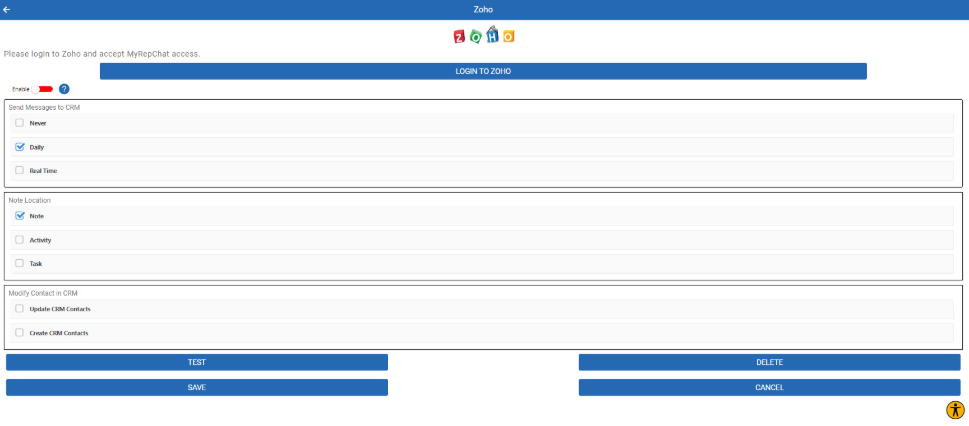
- Click Login to Zoho — you'll be redirected to the Zoho login page.
- Log in and accept MyRepChat's access to your Zoho data. You'll be redirected back to MyRepChat.
- Choose when to send MyRepChat messages to Zoho:
- Daily: Sends the previous day's messages overnight, as one conversation per contact.
- Real Time: Sends each message individually as it happens.
- Choose where messages should be sent in Zoho — as a Note, or as an Activity (either Task or Call) on the contact or lead.
- Click Save.
- Click Test to confirm your configuration is working — a status message appears in a black bar at the bottom of the screen.
What Should I Know About Zoho's API Rate Limits?
Zoho charges for API access beyond a certain limit, deducting "credits" for each call. Your account type determines your starting credit balance. MyRepChat usage is very unlikely to cause overages, but our API calls do reduce your available credits.
Note:
- A search costs 2 credits (checks both Contacts and Leads).
- Sending a note costs 2 credits.
- Testing the integration costs 1 credit.
You can monitor your usage by logging into Zoho and going to Developer Space > APIs > Usage. See Zoho's API limits documentation for full details.
What Is Zoho's Search Behavior?
Each CRM has different search behavior and limitations. For Zoho specifically:
- For contacts, phone searches check the Mobile, Phone, Home Phone, Other Phone, Asst Phone, and Fax fields.
- For leads, phone searches check the Mobile, Phone, and Fax fields.
We recommend using the Mobile field for your Messaging Number, since it's prioritized first for texting. Otherwise, MyRepChat follows the field priority listed above. You can also manually set the Messaging Number in MyRepChat to override this behavior.
- Since Zoho stores phone numbers exactly as entered, MyRepChat tries several formats automatically. If a number isn't saved in one of these formats, MyRepChat won't find the contact.
- For a full 10-digit search:
xxxyyyzzzz(no punctuation),xxx-yyy-zzzz, or(xxx)yyy-zzzz. - For a partial search:
xxxyyyyorxxx-yyyy. - Whatever format you type is also tried as-is — so if a number was saved in an unusual format, searching using that exact format will still find it.
- For a full 10-digit search:
- Name searches with no space check whether your entry appears anywhere in the first or last name fields.
- Name searches with a space check the first name before the space and the last name after it.
- Search covers both Contacts and Leads.
- MyRepChat's group search checks Zoho Tags, is case-insensitive, and matches if your search text appears anywhere in the tag name.