
Integrating with Redtail lets you import your contacts into MyRepChat, and lets MyRepChat record your text messages as notes on your contacts' profiles in Redtail.
See How Do I Import Contacts From My CRM? for general CRM integration features and behavior that apply across providers.
How Do I Set Up the Integration?
- From the Dashboard, go to Settings > Integrations > Connect to CRM.
- Scroll down and click the Redtail box.
- Enter your Redtail username and password.
- Click Connect. If login is successful, you'll receive a token — this field isn't editable. MyRepChat doesn't store your username or password, only the token.
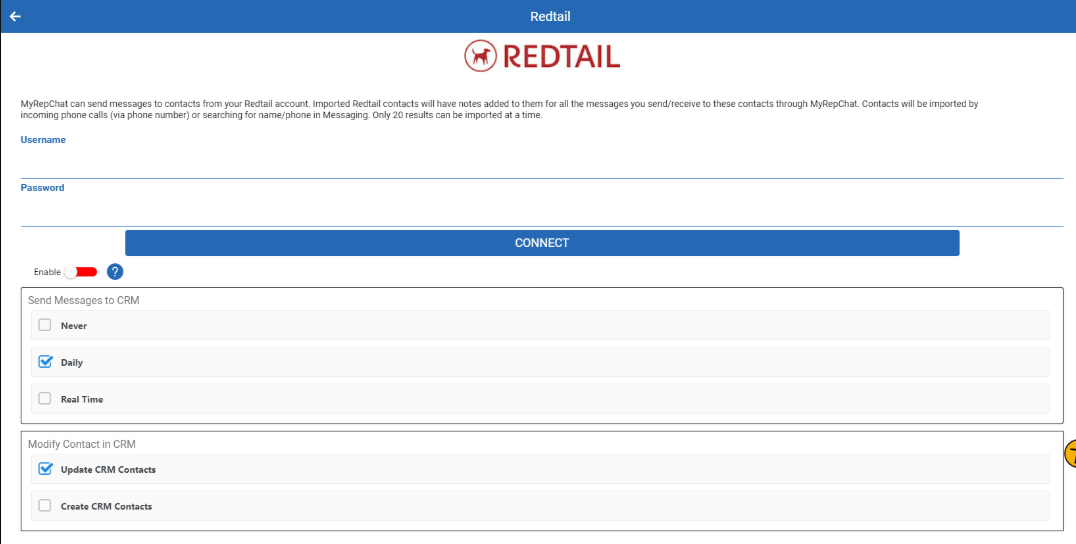
- Move the Enable toggle to on (green).
How Do I Control When Messages Sync to Redtail?
Choose whether your text messages sync to your CRM in real time, daily, or never. In Redtail, messages are stored as notes on the contact.
Note: For notes to be journaled, you must have imported the contact from Redtail first.
What Is Redtail's Search Behavior?
Each CRM has different search behavior and limitations. For Redtail specifically:
- Searches return a maximum of 50 results, so be as specific as possible.
- Phone searches check all phone fields and ignore punctuation.
- Phone searches use a "contains" match, so searching just the last 4 digits will still find a match.
- Name searches check the full name field as a single string.
- You can search using both first and last name separated by a space. Since this searches the full name field rather than separate first/last fields, "Tom J" would match a contact named "Tom Jones," but "To Jon" would not.
- You can search by Redtail Tag Groups using a "contains" match — any tag group containing your search term will be returned.
Warning: Any tag group with more than 50 contacts may not display its complete membership list — this is the same 50-result limitation that applies to name searches.