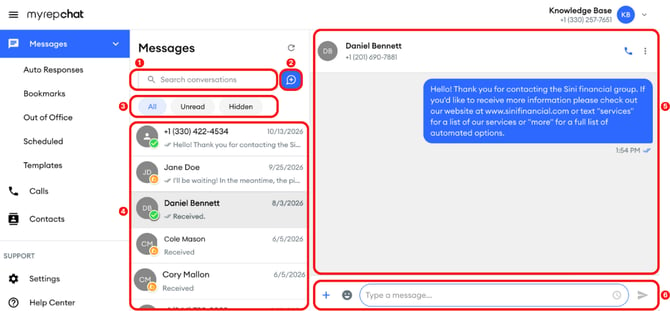
The Messages screen is where you read, find, and send your text messages. Your conversations appear on the left, and the conversation you open appears on the right.
-
Search: find a conversation by name or number.
-
Blue new message button: start a new individual or group message.
-
Filters: show all, unread, or hidden conversations.
-
Conversation list: your recent conversations, with the newest at the top.
-
Open conversation: the contact's name and number, and your conversation history.
-
Message bar: type, add attachments, schedule, and send your messages.
How Do I Find a Conversation?
Type a contact's name or number in Search conversations.
How Do I Start a New Message?
-
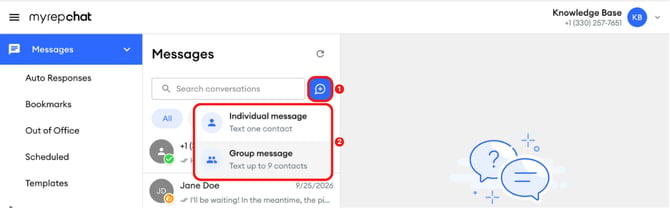
Click the blue new message button.
-
Choose Individual message to text one contact, or Group message to text up to 9 contacts.
For step-by-step instructions, see How do I send a text message? (Desktop) and Group Texting.
How Do I Filter My Conversations?
Click All, Unread, or Hidden above the conversation list.
How Do I Read a Conversation?
Click a conversation in the list to open it. The contact's name and number appear at the top, and the conversation history appears below. Scroll up to read past messages.
How Do I Manage a Conversation?
-
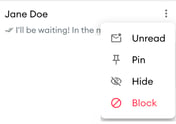
Hover over a conversation in the list, then click the three dots that appear.
- Choose an option:
-
-
Unread: marks the conversation as unread.
-
Pin: keeps the conversation at the top of your list.
-
-
-
Hide: moves the conversation to Hidden.
-
Block: blocks the contact.
-
What Can I Do From the Message Bar?
-
Type a message: type in Type a message...
-
Add emojis: click the smiley face icon.
-
Schedule a message: click the clock icon.
-
Send: click the send icon (paper airplane).
-
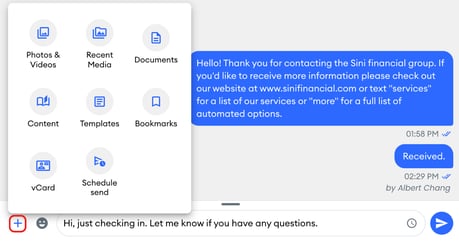
Add more: click + to choose from:
-
Photos & Videos
-
Recent Media
-
Documents
-
Content
-
Templates
-
Bookmarks
-
vCard
-
Schedule send
-
Note: Schedule send is available after you type a message.