![FMG_Logo_RGB_Small_Blk-1.png]](https://help.fmgsuite.com/hs-fs/hubfs/FMG_Logo_RGB_Small_Blk-1.png?width=75&height=49&name=FMG_Logo_RGB_Small_Blk-1.png)
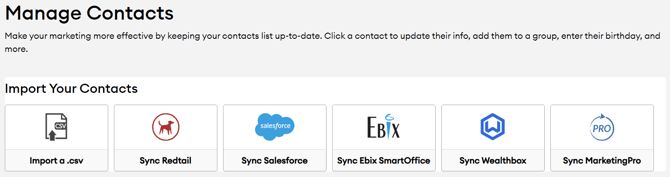
We support contact integrations with the following CRMs. Click on your CRM below to learn how to integrate your contacts:
How to Integrate a CRM
To integrate your CRM with your FMG account, follow these essential steps. For information tailored to your specific CRM, refer to the related link provided above.
-
Access the Contacts Page: In your FMG admin, navigate to Contacts > Manage Contacts in the navigation pane on the left side of your dashboard.
-
Initiate Sync: Click on your CRM under the Import Your Contacts section.
-
Authenticate: Log in to your CRM account. This is a one-time authentication process to enable successful syncing.
-
Configure Sync Settings: In the "CRM Synchronization" modal, select your preferences:
-
What Would You Like To Sync From Your CRM?
-
Decide which contacts from your CRM to add to FMG. You can either sync all your contacts or only those within specific groups.
-
-
Sync Frequency:
-
To enable automatic daily updates, check the box (recommended).
-
If you prefer manual updates, you can initiate an on-demand sync from your Contacts page at any time.
-
-
-
Sync FMG Activity: Check this option if you want FMG to write an activity note to Redtail each time:
- A website or event form is completed
-
An email is sent
-
Someone opts out of your emails
-
Complete Your Sync: ⚠️ During the syncing process, all existing contacts in your FMG admin will be replaced with your CRM contacts. If you have contacts in FMG that aren't in CRM, export them and add them to CRM before syncing.
For more detailed information about your CRM, including what information syncs over, please select the link from the list above.
📢 Please note that once your CRM has been integrated, contact and group edits cannot be made from your FMG account.
All contact/group edits and creation must be made in your CRM account. Depending on your chosen Sync Frequency, these edits will automatically sync to your FMG account daily.
For more details on sync settings and troubleshooting, please select the article link above for your CRM.