![FMG_Logo_RGB_Small_Blk-1.png]](https://help.fmgsuite.com/hs-fs/hubfs/FMG_Logo_RGB_Small_Blk-1.png?width=75&height=49&name=FMG_Logo_RGB_Small_Blk-1.png)
Maintaining a clean email list by reviewing bounced addresses is crucial for successful email delivery and protecting your sender reputation. When a contact's email address is marked as "Bounced" in FMG, they will stop receiving your emails until their status is verified or updated. Since including bounced addresses can negatively impact the deliverability of your emails to other recipients, it is essential to regularly clean your contact list of these non-functional addresses.
In this article, we will cover:
Identifying Bounced Email Addresses
To locate bounced email addresses in your contact list, follow these steps:
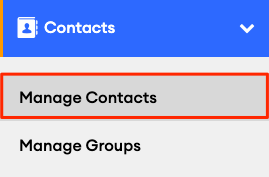
- Navigate to Contacts: Go to Contacts >> Manage Contacts:
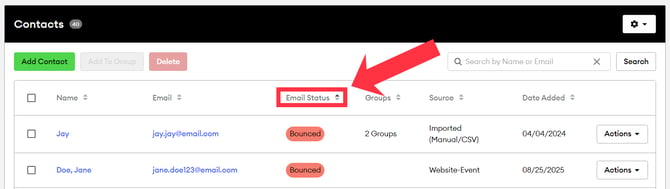
- Sort by Email Status: On the Contacts page, you'll see a table listing your current contacts. Click the "Email Status" column to sort bounced email addresses to the top of the list:
Managing Bounced Contacts
To maintain a clean email list and ensure reliable delivery to other contacts, it is advisable to remove any contact with a bounced status that you no longer email. If you recognize the contact and believe the address is still accurate, you can attempt to verify the contact instead.
If you no longer need to email the contact:
-
On Contacts >> Manage Contacts, locate the bounced contact(s).
-
Check the box next to the contact(s).
-
Click Delete to remove them from your list.
Note: The Delete option is not available if your contacts are synced with a CRM. See the CRM section below for how to handle those bounced addresses.
Verifying Bounced Contacts
If you are sure that a bounced email address is valid and you have permission to resubscribe that contact, you can try re-verifying the address so it receives your email communications again.
Do not use verification to try to force delivery to addresses you know are invalid or to contacts who have opted out.
How to verify a bounced email
-
Identify the bounced contact in your FMG contact list, then click on the email address or contact name.
-
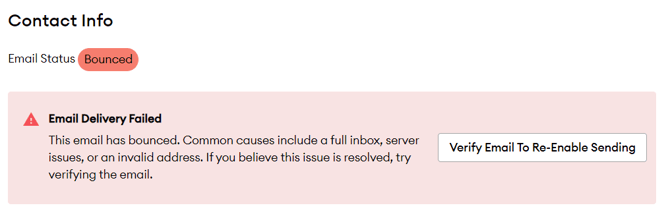
On the contacts' details page, if the contact has a bounced email status, you wil see an "Email Delivery Failed" message:
-
Click Verify Email To Re‑Enable Sending
-
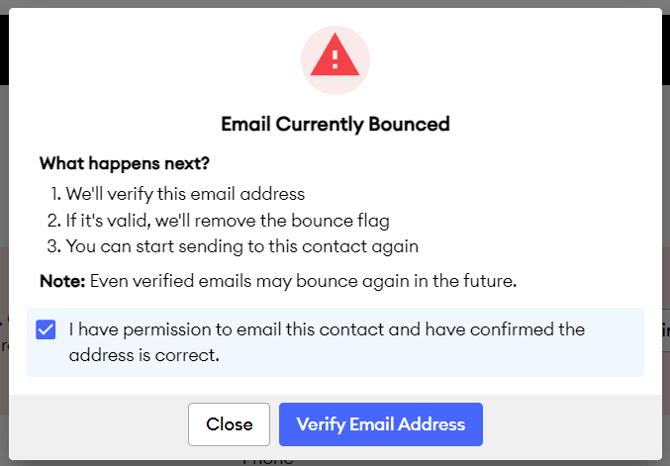
In the pop‑up, check the box confirming you have permission to email this contact and that the email address is accurate.
-
Click Verify Email Address to start the verification process with our email service provider. This may take a few minutes.
- If the email address is verified, then the contact will be automatically resubscribed to receive emails from your FMG account again.
For Users Integrated with a CRM
For users who are integrated with a CRM (such as Redtail), if you need to remove a contact, you must do that in your CRM. However, you can re-verify a bounced contact in FMG using the steps above.