
An Out of Office Response is an automatic reply that sends to contacts who message you while you're away. It's useful for letting clients know you're on vacation, in back-to-back appointments, or otherwise unavailable to respond right away.
Set up your Out of Office Response
-
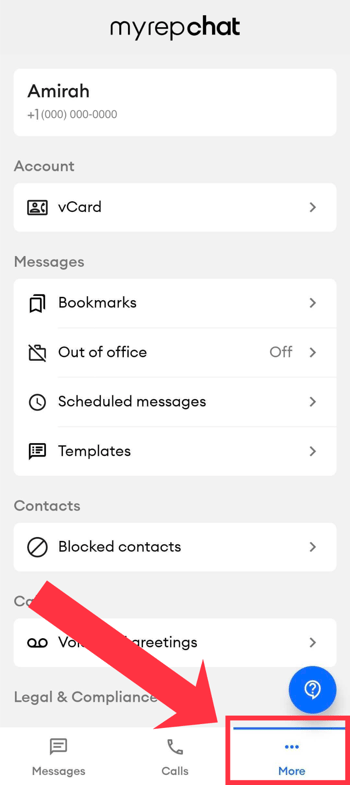
Tap the More tab in the bottom navigation bar.
-
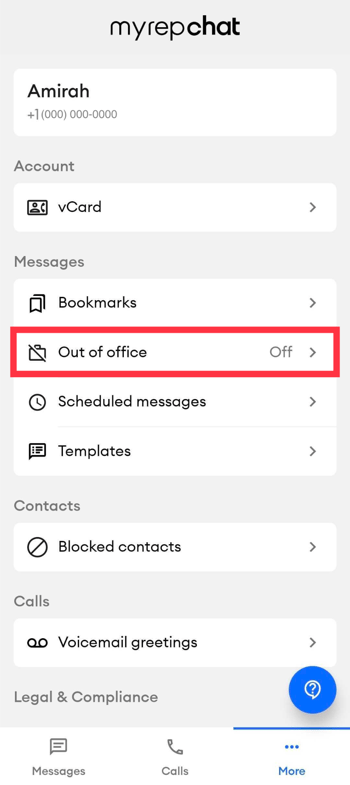
Select the Out of Office option under the messages section.
-
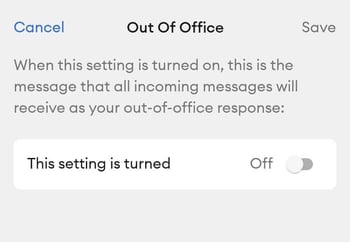
Toggle the setting on.
-
Type the message you want contacts to receive when they reach out.
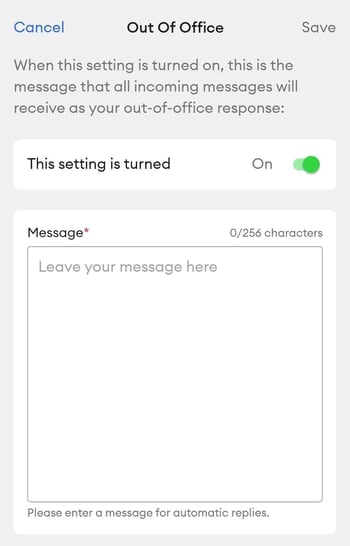
- Tap Save in the top right corner.
Once enabled, your Out of Office Response will automatically send to everyone who messages you.
Turn off your Out of Office Response
Since you cannot schedule a start and end time for your Out of Office Response, remember to turn it off manually when you're back and able to respond normally.
- Tap the More tab in the bottom navigation bar.
- Select Out of Office Response.
- Toggle the setting off.
Tip: Before heading out, double-check that your Out of Office Response is toggled on and that your message is up to date. When you're back, turning it off is the first thing to do so clients receive your replies directly.