
How Do I Create a Desktop Shortcut?
- Open an internet browser (not Safari).
- Sign in to your account.
- Click the monitor icon to the right of the URL bar.
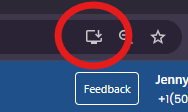
- When the pop-up appears, click Install.
- The app will appear on your taskbar, and you'll get a notification asking if you'd like to pin it there. We recommend pinning it to your taskbar for quick access going forward.
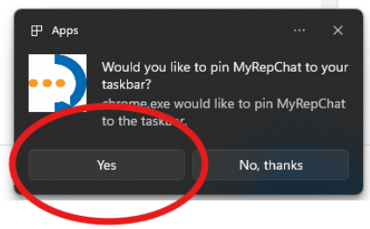
- Once pinned, clicking the icon will either take you straight into your account or prompt you to log in.