
A vCard is a virtual business card that makes your contact information easily accessible to you and your contacts.
Important Notes:
- Some broker-dealers or groups may require approval of vCard changes. If this applies to you, your changes won't appear until approved by your group's administration.
- Do not use colons (:) or semicolons (;) in any vCard field — these characters are used as field separators and will break the vCard.
- You must set up your vCard in the MyRepChat web app before you can send it from mobile.
How Do I Edit My vCard in the Mobile App?
-
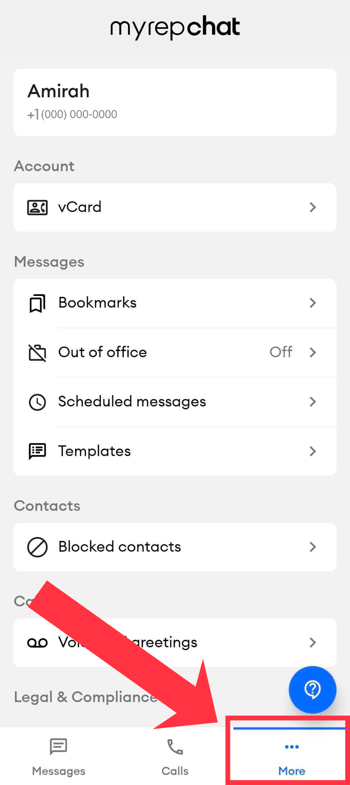
Tap the More tab in the bottom navigation bar.
-
Tap vCard under the Account options.
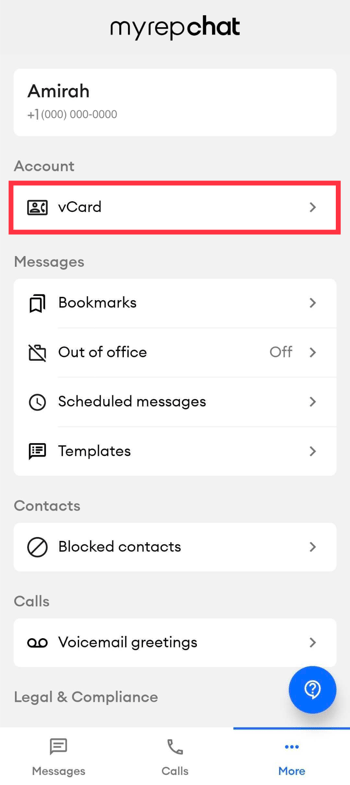
- You'll see your current vCard and whether it's approved or pending approval. Tap it to edit.
- You'll land on the vCard details page, where you can update your information.
If your broker-dealer or group requires approval, your edited vCard will show as pending, and your previous, already-approved vCard will remain in use until the changes are approved.