
There are several reasons a text message might fail to send.
Reason 1: Are you using a text-enabled landline?
It can take about a day for your number to become fully text-enabled after you submit your request. Make sure you've completed both of the following:
-
Verified your number with an authentication call.
-
Signed the Letter of Authorization (LOA).
You'll get an email once your number is ready. Until then, it can't send or receive messages through MyRepChat.
Reason 2: Is your contact's number set up correctly?
-
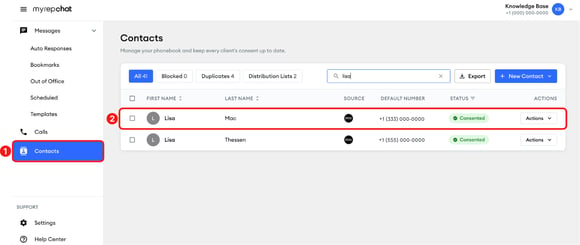
In the left menu, click Contacts.
-
Search by name or number to find the contact, then click it.
-
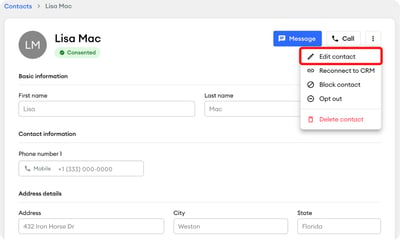
Click the three-dot menu in the upper-right corner, then select Edit contact.
-
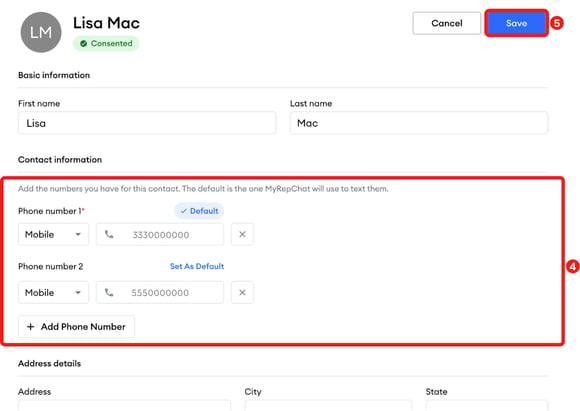
Under Contact information, check that the right number is marked Default. That's the number MyRepChat uses to text this contact. To use a different number, click Set As Default next to it. To add a number, click Add Phone Number.
-
Click Save in the upper-right corner.
Reason 3: Is your account in Active status?
If you're part of a group, your group may place new accounts in Review status by default. While in Review, you can do everything except send messages.
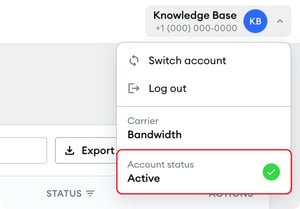
To check your status, click your account name in the upper-right corner. Your status shows under Account status as Active or Review. If you're in Review status, contact your group admin.
What are other reasons a message might fail?
-
The number you're texting can't receive texts.
-
You or the recipient are in an area with poor signal.
-
The recipient hasn't replied "Accept," and your group requires Positive Consent.
-
The recipient opted out by replying "Stop" to a Positive Consent text.
-
Something in the message triggered a compliance pre-review, which needs admin approval before sending.
-
The recipient's number has been disconnected.
-
The number entered isn't valid.
-
You're sending a group text to more recipients than your group administrator allows.
If none of these apply, contact our Client Experience Team at support@myrepchat.com or (844) 402-2428.