
If consent is required and you send a message to a distribution list where not everyone has consented, here's what happens:
-
Contacts who have consented will receive your message as normal.
-
Contacts who haven't consented yet won't receive anything until they do.
How Do I Send a Consent Request to a Distribution List?
-
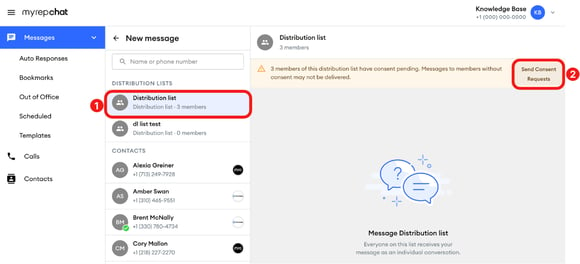
In Messages, select the blue new message button, then select your distribution list under Distribution Lists.
-
If any members have consent pending, a banner shows how many. Select Send Consent Requests.
-
In the pop-up, select Send consent requests. The request goes to every member with pending consent. Members who already consented won't receive one.
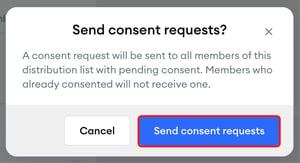
A confirmation briefly appears: "Consent requests sent to pending members."
Select Send Consent Requests only once, then wait. The banner and the button stay on screen after you send, and selecting it again can send the same request to the same contacts. For larger distribution lists, sending can take some time.
If your group uses positive consent, contacts need to reply ACCEPT before they can receive your messages. Wait several hours to a full day before following up, to give them time to respond.