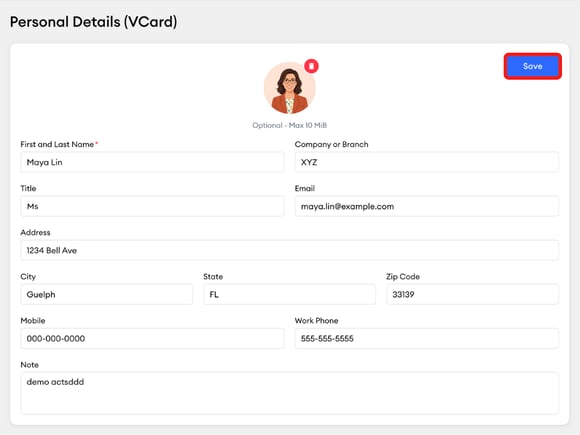
A vCard is a virtual business card that makes your contact information easily accessible to you and your contacts.
Some broker-dealers or groups may require approval of vCard changes. If this applies to you, your changes won't appear until approved by your group administrator.
Do not use colons (:) or semicolons (;) in any vCard field — these characters are used as field separators and will break the vCard.
You must set up your vCard before you can send it, even if some fields were pre-filled during your initial account setup.
How Do I Set Up or Edit My vCard?
-
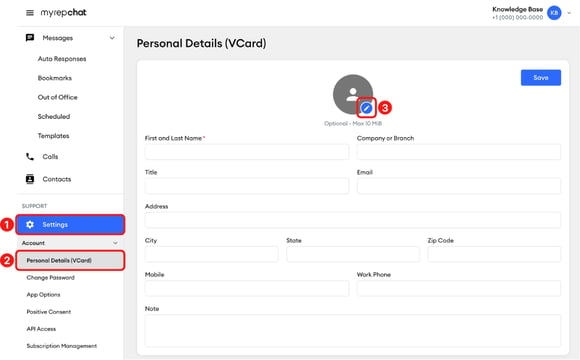
In the left menu, click Settings.
-
Under Account, click Personal Details (vCard).
-
Click the pencil icon to add your contact photo.
-
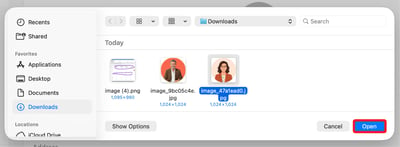
Select the photo you'd like to upload from your computer and click Open to upload the image to your vCard.
-
Complete your contact information fields, including your first and last name, company or branch, title, email, address, mobile, and work phone. You can add a note or tagline in the Note field.
-
Click Save to apply your changes.