
You can update your password in two ways: reset it if you've forgotten it, or change it while logged in to MyRepChat.
How do I reset a forgotten password?
-
On the MyRepChat sign-in page, click Forgot Password?
-
Enter your email address, then click Reset Password.
-
Check your email for your new password.
-
Sign in with the new password, then change it to one of your own using the steps below.
How do I change my password while logged in?
-
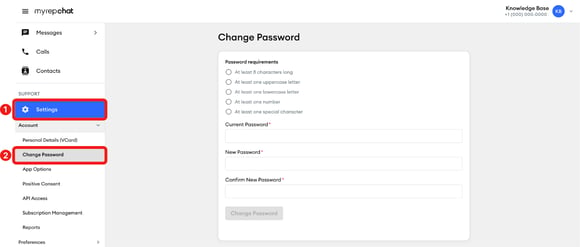
In the left menu, click Settings.
-
Under Account, click Change Password.
-
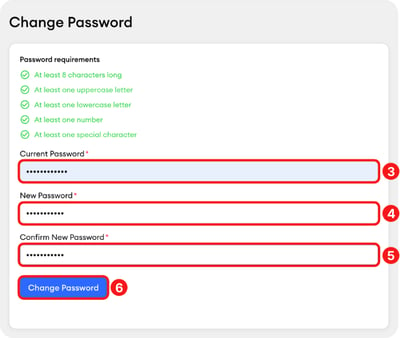
Enter your current password.
-
Enter your new password. Your new password must have:
-
At least 8 characters
-
At least one uppercase letter
-
At least one lowercase letter
-
At least one number
-
At least one special character
-
- Enter your new password again under Confirm New Password.
- Click Change Password.
Having trouble changing or resetting your password? Contact our Client Experience Team at support@myrepchat.com or (844) 402-2428.