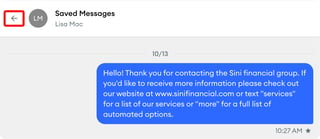
You can pin, hide, or mark a conversation as unread from the Messages list or from inside the conversation. You can also save individual messages so you can find them later.
How do I pin, hide, or mark a conversation as unread?
-
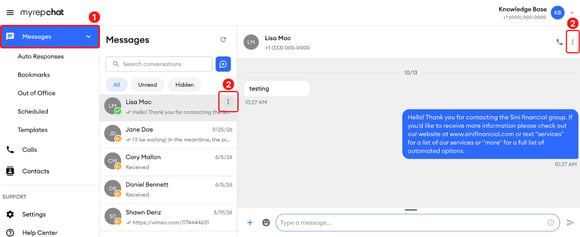
In the left menu, click Messages.
-
Hover over the conversation, then click the three-dot menu that appears. You can also open the conversation and click the three-dot menu in the upper-right corner.
-
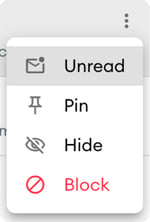
Select one of these options:
-
Unread: Marks the conversation as unread. A blue circle with the number of unread messages appears on the right side of the conversation.
-
Pin: Moves the conversation to the top of your Messages list, with a pin icon on the contact's picture.
-
Hide: Hides the conversation from your Messages list. In the Hide Conversation window, click Hide.
-
To mark a conversation as read, open it, or select Read from its three-dot menu without opening it. To unpin a conversation, open the menu and select Unpin. To unhide a conversation, see the next section.
How do I find and unhide a hidden conversation?
-
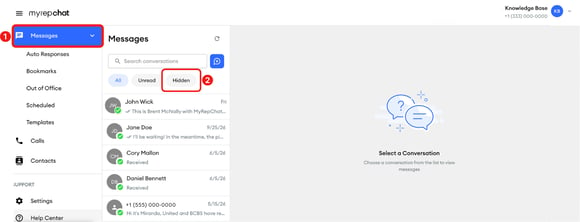
In the left menu, click Messages.
-
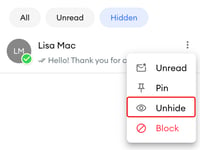
At the top of the Messages list, click Hidden.
-
Hover over the conversation, click the three-dot menu, then select Unhide.

How do I save a message?
-
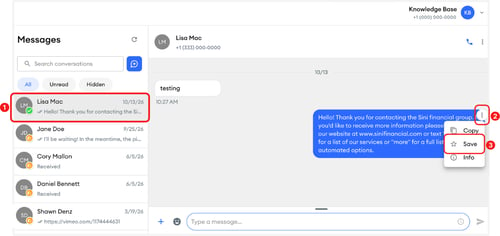
Open the conversation.
-
Hover over the message, then click the three-dot menu that appears next to it.
-
Select Save. A star appears under the message.
To remove it, open the message's three-dot menu again and select Unsave.
How do I see my saved messages?
-
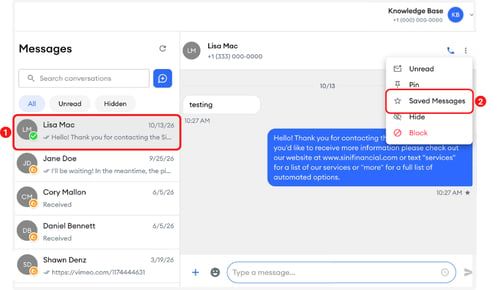
Open the conversation.
-
Click the three-dot menu in the upper-right corner, then select Saved Messages.
-
To go back to the conversation, click the back arrow.