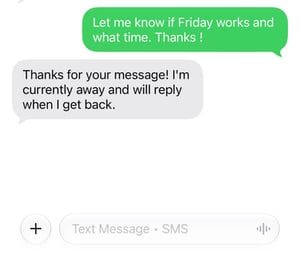
MyRepChat can reply to texts for you when you can't. On the Out of Office page, you can set up two types of auto-replies:
Out of office: for a stretch of time away, such as vacation, travel, or time off.
After working hours: for messages that arrive outside your regular business hours every week.
Each one has its own toggle, message, and Save button.
How do I set up an out-of-office auto-response?
-
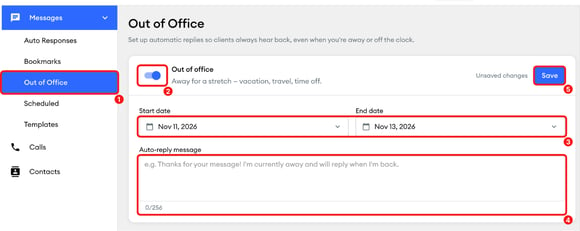
In the left menu, select Messages, then Out of Office.
-
Turn on the Out of office toggle.
-
Select a Start date and an End date.
-
Type your message in the Auto-reply message box. You can use up to 256 characters.
-
Click Save. "Unsaved changes" appears next to Save until you save, and the Save button grays out once your changes are saved.
How do I set up an after-working-hours auto-response?
-
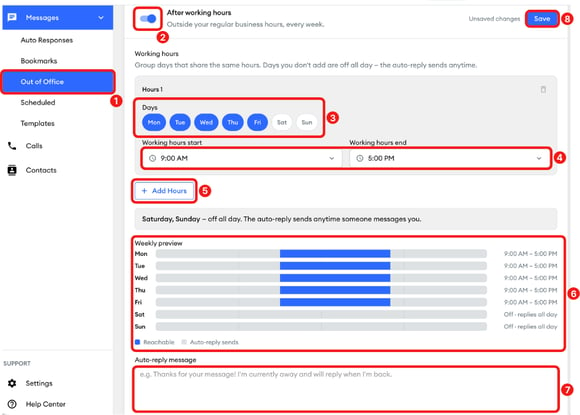
In the left menu, select Messages, then Out of Office.
-
Turn on the After working hours toggle.
-
Under Working hours, in Hours 1, select the days that share the same hours.
-
Select your Working hours start and Working hours end.
-
To set different hours for other days, select Add Hours. Days you've already added aren't available to select. To remove a group of days, select the trash icon next to it.
-
Check the Weekly preview. Blue shows when you're reachable, and gray shows when the auto-reply sends. Days you don't add are off all day, so the auto-reply sends anytime someone messages you on those days.
-
Type your message in the Auto-reply message box. You can use up to 256 characters.
-
Click Save.
How do I turn off an Out of office or After working hours reply?
Turn off the toggle for the auto-reply you want to stop, then select Save.
What will the Out of office or After working hours reply look like?
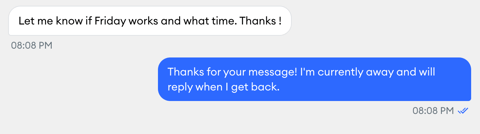
In MyRepChat, the client's text appears in the conversation as usual, and your auto-reply appears right after it as a message you sent.
On the client's phone, the auto-reply arrives like a regular text message.