
Note: This article is only applicable to Publisher users with access to create Web Content Articles.
Web Content Articles allow you to create and distribute original Web Content directly to your affiliated subscribers. Once published, articles appear on subscriber websites and in their Content Library. This guide covers everything you need to know to create and configure a Web Content Article in your Publisher account.
Creating Article Content
To begin creating article content, log in to your Publisher account and navigate to Publish > Web Content.
- Create a New Article: Click the "+ Article" button.
- Display Information: Add the following details:
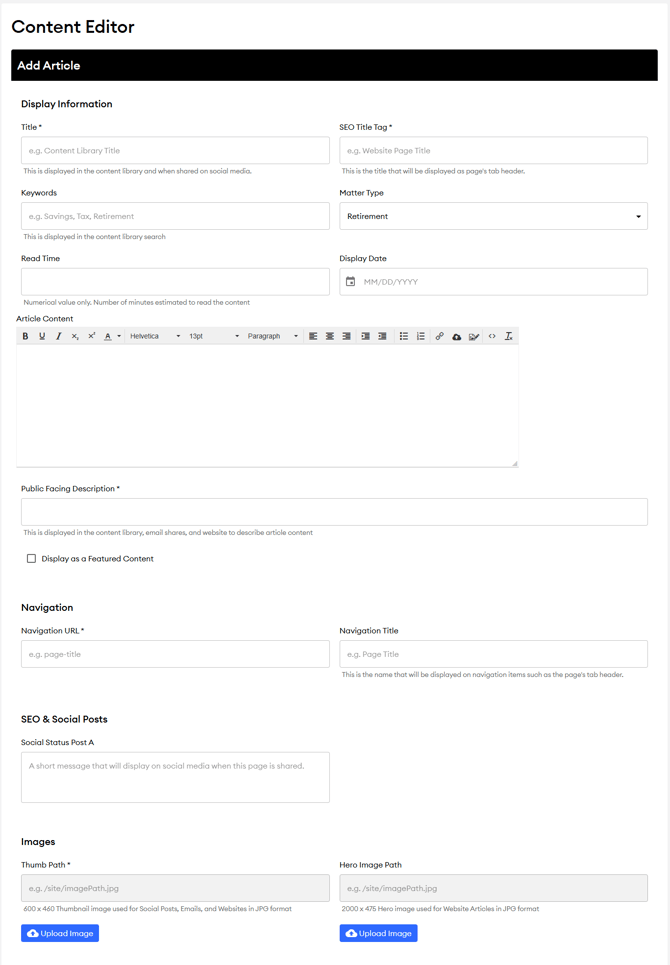
- Title: Displayed in subscribers' content libraries and on social media.
- Header Title: Shown on website pages.
- Keywords: Used for content library searches. Ensure keywords are specific to your agency for accurate display on Syndicated Library Pages.
- Matter Type: Categories describing the content type, such as Retirement, Investment, Estate, Insurance, Tax, Money, and Lifestyle.
- Read Time: Estimated reading time in minutes; use numerical values only.
- Display Date: The date shown with the content. If left blank, it defaults to the last update date.
- Article Content: Use the rich text editor to add your content, including font adjustments, lists, links, and images.
- Public Facing Description: This displays in the Content Library, in email, and on websites to describe the article.
- Navigation:
- Navigation URL: This URL will display on subscriber sites and must be entered.
- Navigation Title: The Navigation title will appear in the page tab header.
- Images:
- Thumb Path: Thumbnail image for social media, emails, and websites. Recommended size: 600 x 460 JPG format.
- Hero Image Path: Hero image for website articles. Recommended size: 2000 x 475 JPG format.